Mass Video Management
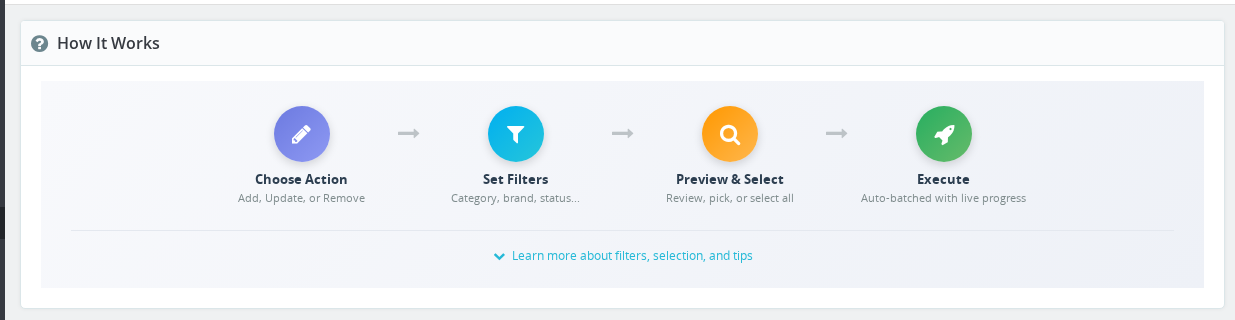
Mass Video Management lets you add, update, or remove videos across hundreds of products in a single operation. This overview explains how the four-step workflow — filter, choose action, preview, execute — keeps bulk changes safe and predictable.
What is it?
Mass Video Management lets you add, update, or remove videos from multiple products at once. Instead of editing products one by one, you can apply changes to hundreds of products in minutes.
Perfect for:
- Adding promotional videos to a collection
- Updating video positions across products
- Removing outdated videos
- Managing videos by manufacturer
🔑 How to Access
Catalog → Mass Video Management
How It Works
The 4 Steps
1. Filter Products Select which products to affect using category, manufacturer, or status filters. → Learn about Filtering
2. Choose Action
- Add - Add new videos to products
- Update - Change existing video properties (title, position, restrictions)
- Remove - Delete videos from products (irreversible!)
3. Preview Check which products will be affected before making changes.
This is your only chance to verify before changes are applied. Remove operations cannot be undone!
4. Execute Apply the changes to all selected products.
→ Learn about Preview & Execute
Quick Examples
| What You Want | Action | Filters |
|---|---|---|
| Add promo video to summer collection | Add | Category: Summer |
| Move all videos to last position | Update | Has Videos: With Videos |
| Remove videos from inactive products | Remove | Active: Inactive Only |
| Add manufacturer video to their products | Add | Manufacturer: Nike |
Important Reminders
Deleted videos cannot be recovered. Always preview carefully before removing!
Best Practices:
- Always preview before executing
- Test with 2-3 products first when learning
- Work during low-traffic hours for large operations
- Double-check filters for remove operations
Is the Remove action in Mass Video Management reversible?
No. Removing videos through Mass Video Management permanently deletes the video entries from the database. There is no undo. Always preview the affected products carefully and consider testing on a small batch first.
How do I access Mass Video Management?
In your PrestaShop back office, go to Catalog and then Mass Video Management. This section is added by the Product Video module.
Can I apply changes to all products in the catalog at once?
The tool requires at least one filter to be set before you can run an operation. This is a safety measure to prevent accidental changes to your entire catalog.
What does the Preview step show me?
The preview shows the total number of affected products and a list of up to 100 of them with their ID, reference, and name. All matching products will be affected when you execute, even those beyond the first 100 shown.
Need Help?
📖 Use Cases
Step-by-step examples for common scenarios
🔧 Troubleshooting
Solutions to common problems
Last updated: 2025-12-16