Product Options & Catalogue
Set how products are identified in pixel events and link your store to the right Meta product catalogue for dynamic ads.
Available since v1.5
Overview
For dynamic product ads to work on Facebook and Instagram — where Meta automatically shows shoppers the exact products they viewed — two things must match perfectly: the product identifier in your pixel events and the product identifier in your Meta product catalogue feed.
This section has two jobs. First, it controls the identifier strategy: whether the module uses PrestaShop's internal product ID number (recommended) or the product reference/SKU field you enter manually on each product. Second, it stores your Catalogue ID so Meta can connect pixel events to specific catalogue items and show the right product in retargeting ads.
Getting these two settings right is the foundation of dynamic ads. A mismatch — even a single underscore difference — will break product matching and your dynamic ads will either show wrong products or fail to render entirely.
Configuration
Setting the identifier type
- Go to Modules > Module Manager > Pixel Plus for Facebook > Configure.
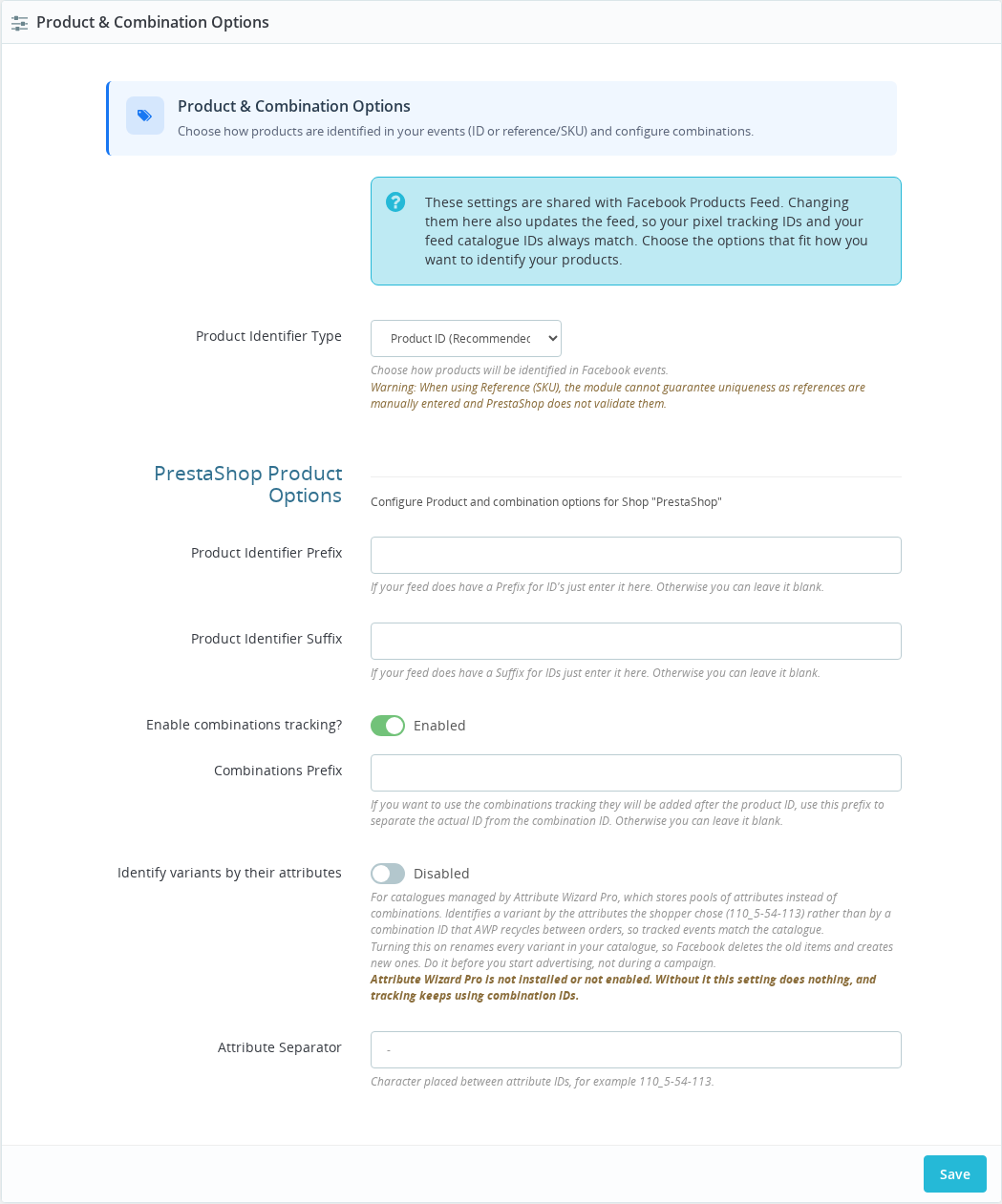
- Locate the Product & Combination Options panel.
- Select your Product Identifier Type: Product ID (Recommended) or Product Reference (SKU).
- If your Meta product feed uses a text prefix before each product ID (for example your feed exports
MYSHOP_42instead of just42), enter that prefix in the Product Identifier Prefix field. - If you want Meta to track specific product variants (sizes, colours) separately rather than just the base product, enable Enable combinations tracking? and set a Combinations Prefix (commonly a dash:
-). - Click Save.
The Product Identifier Type option is a global setting — it applies to all shops in your installation. Changing it after launch requires you to also update your Meta product catalogue to use the same identifier format.
Linking your Meta Catalogue
- In Meta Commerce Manager, open your catalogue and copy the numeric Catalogue ID (a large number shown under the catalogue name in Settings).
- Scroll to the Catalogue ID Association panel.
- Paste the Catalogue ID into the field for your shop.
- Click Save Configuration.
| Field | Default | Multi-shop scope | Description |
|---|---|---|---|
| Product Identifier Type | Product ID (Recommended) | Global — all shops | How products are identified in all pixel events. Product ID uses PrestaShop's auto-generated numeric ID. Product Reference (SKU) uses the reference field on each product. |
| Product Identifier Prefix | (blank) | Per shop | A text string prepended to every product ID in events. Must exactly match the prefix used in your Meta product feed. Leave blank if your feed exports bare IDs. |
| Enable combinations tracking? | Disabled | Per shop | When on, product variants (size, colour) are sent with their own unique identifier instead of the base product ID. Only applies in Product ID mode. |
| Combinations Prefix | (blank) | Per shop | The separator inserted between the product ID and the combination ID in the compound identifier. Typically a dash: -. |
| Catalogue ID | (blank) | Per shop | The numeric Meta Commerce catalogue ID. Required for dynamic product ads. |
How It Works
Every pixel event that includes product data — ViewContent when someone views a product, AddToCart when they add it, Purchase when they buy — includes a content_ids field. That field is the product identifier the module sends to Meta.
Meta takes that identifier and looks it up in your product catalogue. If it finds a match, it knows exactly which product the event is about — and can use that for retargeting (showing the same product in an ad), for reporting (which products drive the most conversions), and for audience building (people who viewed dresses).
If the identifier in the pixel event doesn't match the identifier in the catalogue, Meta can't make that connection.
Product ID mode
Product ID is the safe default. PrestaShop auto-generates these IDs and they never change. If you use a prefix (for example PS_), the module prepends it so that 42 becomes PS_42 in every event. Your product catalogue feed must export the same prefix.
Product Reference (SKU) mode
Product Reference sends the SKU field you've entered on each product page as the content_id. This is useful only if your Meta product catalogue is built around SKU references rather than numeric IDs — for example, if you use an external feed tool that exports by reference.
In Reference mode, PrestaShop does not enforce uniqueness of the reference field. Two products can share the same reference, which silently breaks matching. Use Reference Diagnostics to scan for missing or duplicate references before relying on this mode.
When a product has no reference set and Reference mode is active, the module records a fallback event using the product ID instead and increments a fallback counter visible in Reference Diagnostics. That fallback identifier will not match a reference-based catalogue entry.
Combination tracking
When Enable combinations tracking? is on, each product variant gets its own unique identifier. In Product ID mode the compound format is {product_id}{prefix}{combination_id} — for example 42-15 for product 42, combination 15, with a dash prefix.
In Reference mode, the combination's own reference field is used when available. If a combination has no reference, the module falls back to the Product ID format: {prefix}{product_id}{combinations_prefix}{combination_id}. That fallback will not match a reference-based catalogue — Reference Diagnostics lists the combinations affected.
Combination tracking only makes sense if your Meta product catalogue also lists each combination as a separate item with the matching compound identifier.
Catalogue ID
The Catalogue ID you enter in the Catalogue ID Association panel is attached to the pixel initialisation code that loads on every page. Meta uses it to associate ViewContent, AddToCart, and Purchase events with specific catalogue products for dynamic ad delivery and reporting.
If you are running a multi-language store without the companion Facebook Products Feed module (v2.0.5 or later), the Catalogue ID field appears once per shop language, and you should enter the same ID in each field.
Usage Examples
Example: Standard store with auto-generated feed You use Pixel Plus's own product feed or a feed tool that exports PrestaShop's internal product IDs. Keep Product Identifier Type at Product ID (Recommended), leave the prefix blank, and paste your Catalogue ID. Everything matches automatically.
Example: Store with ID prefix in an existing feed
Your Meta catalogue was set up with a third-party tool that prefixes all IDs with PS_. Your catalogue items are PS_42, PS_43, and so on. Set Product Identifier Prefix to PS_ in the module. Pixel events now send PS_42 as the identifier, matching your catalogue.
Example: Clothing store tracking variants
You sell shirts in multiple sizes and colours. Enable Enable combinations tracking? and set Combinations Prefix to -. Your catalogue feed also exports combinations as individual items. A size M blue shirt (product ID 42, combination ID 15) becomes 42-15 in both the pixel event and the catalogue feed. Dynamic ads can then show the exact variant a customer viewed.
Important Notes
- Product Identifier Type is a global setting shared across all shops. Changing it after your store has been running requires updating your Meta product catalogue to use the same identifier format — otherwise existing dynamic ad audiences break and you may lose retargeting data.
- The prefix must match exactly, including capitalisation, underscores, and any trailing separator. Verify by viewing a product page and checking the
content_idsvalue in the Facebook Pixel Helper browser extension. - Combination tracking only makes sense if your Meta catalogue also lists combinations as individual items with matching compound identifiers.
- If a product's reference field is blank and Reference mode is active, the module falls back to sending the product ID and counts the event as a fallback. Use Reference Diagnostics to find and fix missing or duplicate references.
- In single-shop setups, product option fields appear without per-shop headers.
- Multi-language stores using the legacy feed format (without Facebook Products Feed v2.0.5+) need a Catalogue ID entered per language. Enter the same ID in all language fields.
Troubleshooting
| Problem | Solution |
|---|---|
| Dynamic ads show wrong products | The content_ids in pixel events don't match your catalogue. Check that the identifier type and prefix in the module exactly match what your catalogue feed exports. |
| ViewContent events don't connect to catalogue items | Your Catalogue ID may be missing or incorrect. Verify it in Meta Commerce Manager under the catalogue Settings, then re-enter it in the module. |
| Combination variants not shown separately in Meta | Confirm Enable combinations tracking? is on and that your catalogue feed exports each combination as a separate item with a matching compound identifier (42-15 format). |
| Reference mode events have mismatched IDs | Run Reference Diagnostics to find products with empty or duplicate references. The fallback counter on that panel shows how many events have been affected. |
| Catalogue ID field appears once per language | Your store is using the legacy feed format. Enter the same Catalogue ID in all language fields — they all point to the same catalogue. |
Frequently Asked Questions
How do I find my Meta Catalogue ID?
Open Meta Commerce Manager, click Catalogues in the left menu, select your catalogue, then go to Settings. The Catalogue ID is the large number shown at the top of that page.
Should I use Product ID or Product Reference (SKU)?
Use Product ID unless you have a specific reason not to. Product IDs are guaranteed unique and never change. References are manually entered and PrestaShop does not enforce uniqueness — duplicates or missing values silently break dynamic ads.
What happens if I leave the Catalogue ID blank?
ViewContent and other events still fire and reach Meta, but Meta cannot associate them with specific catalogue products. Dynamic product ads — showing the exact product a customer viewed — require the Catalogue ID to function.
Can I have different Catalogue IDs for different shops?
Yes. The Catalogue ID field is per shop. Each shop in a multi-shop setup can link to its own separate Meta catalogue.
I switched from Product ID to Reference mode. Do my existing audiences break?
Yes, if your Meta catalogue was built using numeric product IDs. When you switch modes, the content_ids values in pixel events change, and Meta can no longer match them to the catalogue entries it already knows. Update your catalogue to reference mode identifiers before switching, or expect a period where retargeting audiences stop matching.
Does the module track both the base product and its combination?
When Enable combinations tracking? is on, the module sends the combination's compound identifier (for example 42-15) rather than just the base product ID (42). Meta sees only the combination as the matched catalogue item.
Related Features
- Reference Diagnostics — When using Reference mode, scan your catalogue for products with missing or duplicate references and monitor the fallback counter.
- Google Product Taxonomy — Assign standardised product categories to improve Meta's ability to classify your catalogue items.
- Trackable Events — All events that include product data use the identifier type configured here.